


What is Battery Monitor & How to Use It
 653
653What is a Battery Monitor?
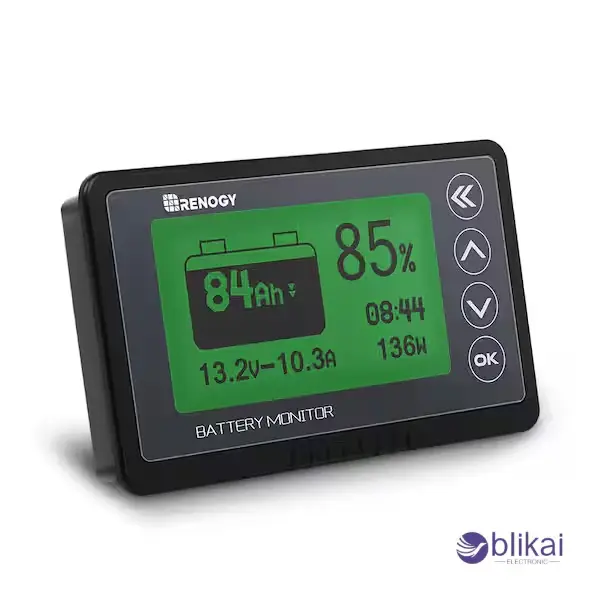
A Battery Monitor is a special instrument or a system that is used to monitor and control the performance of a battery. Its main role is to regulate the crucial parameters like voltage, current, state of charge (SOC) and in some cases temperature, which will give real-time information on the health and performance of the battery. A Battery Monitor can eliminate overcharging, deep discharging, or other habits that would shorten battery life by providing users with an accurate picture of the battery status.
What Are the Applications of Battery Monitors?
- Automobiles: The Battery Monitor is installed in modern cars to monitor the voltage levels and alert the driver in case the battery is going to break down.
- The Electric Vehicles (EVs): EVs have a Battery Monitor, which is a device that manages each battery cell, which happens to supervise the charging process and maximize the energy usage. Proper SOC indicators aid the trip planning, prevent heavy discharges, and increase battery time.
- Solar Energy Systems: A Battery Monitor is used in solar systems to monitor the discharge and recharge of the deep-cycle batteries. It has effective battery utilization and can be connected with solar controllers to control energy in real time.
- UPS and Backup Systems: In the case of UPS and backup systems, a Battery Monitor warns the user about low charge or battery malfunctions. This helps to eliminate unexpected power failures and guard essential devices such as servers or medical devices.
How Does a Battery Monitor Work?
Monitoring Principles
A Battery Monitor measures voltage, current and temperature with sensors or shunts in the battery circuit. It measures the state of charge (SOC), health, and performance of the battery in real-time by measuring these parameters correctly. Their higher-end monitors are also able to compute the energy consumed, efficiency, and remaining runtime, thus being important even in critical systems like electric cars, solar storage systems, and industrial UPS systems.
Data Analysis and Display
Once data has been collected, a Battery Monitor processes the data and displays it as dashboards, mobile applications, or desktop applications. Users are able to see real-time metrics, past trends and performance snapshots. With visual graphs and charts, one can quickly see inefficiencies or abnormally happening patterns, whereas with advanced systems, predictive insights can be obtained to streamline charging cycles, energy consumption, and battery life.
Smart Alerts and Notifications
Professional Battery Monitor has smart alarm features to alert when the battery is under voltage, being overcharged, the current is high, or the temperature is too high. These warnings exclude the permanent battery damage, reduce downtimes and offer operational safety. Critical uses such as electric vehicles, solar systems or backup power systems can be notified in time to take corrective action before the system goes down and improve its reliability and performance.
What Is the Difference Between a Shunt and a Battery Monitor?
Definition of a Shunt
A shunt is a narrow-accuracy resistor that gauges electric current by the voltage drop across the shunt. When current is passed through the shunt, it causes a small voltage that is proportional to the current that can be observed through monitoring devices. Although a shunt is very precise in current measurement, there are other parameters that a battery can measure, such as voltage, temperature, or state of charge (SOC), and a shunt cannot measure these parameters single-handedly.
Key Differences Between Shunt and Battery Monitor
This is the main distinction between a shunt and a Battery Monitor: the range of functionality. A shunt can only measure current and needs further apparatus to give a complete battery status. A Battery Monitor, on the other hand, is a one-stop solution, able to show real-time data, performance as time goes on and issue alerts on abnormal conditions like overcharging, deep discharge or extreme temperatures.
Use Cases
Shunts can be used in cases where current measurement only needs to be made, like measuring simple circuits or augmenting with bespoke energy management systems. Engineers and hobbyists usually use them for certain measurements. Conversely, a Battery Monitor is required where complete battery control is important, including electric cars, solar power and industrial backup batteries. Real-time monitoring, data logging and alerts play a key part in the safety and performance in such instances.
How to Use a Battery Monitor?
Choose the Right Battery Monitor
First, identify the type of battery that you are using, whether it is a lead-acid battery, a lithium-ion battery, or any other chemistry and the voltage and capacity characteristics of the battery after the features desired by your application are considered. Simple monitors only detect voltage, current, whereas more sophisticated monitors estimate state of charge (SOC), temperature, historical data and can be remotely accessed via application or software. Choosing the monitor that will fit your technical needs as well as your desired functionality is a sure way to have a good monitoring experience, alert system and general battery control.
Installation and Setup
- Choose the Proper Wiring Method
Battery Monitor installation begins with the choice of the appropriate type of wiring. Some monitors are directly connected in series to the battery, and others measure current by a shunt.
- Integrate with Battery Management Systems (BMS)
Multi-cell battery packs (e.g., electric vehicle battery packs or solar storage systems) can include a monitor that is combined with a Battery Management System (BMS). This configuration enables the monitor to monitor the voltages of the individual cells, temperatures and other important measurements. Make sure that all your connections are safe, properly polarised, and not corroded to ensure that you, of course, have a reliable reading.
- Initial Calibration
After physical installation, perform initial calibration. Enter the rated capacity of the battery, the nominal voltage of the battery and program the state of charge (SOC) bottom. Others have higher-order monitors which use software-controlled calibration, available to adjust readings after a series of charge-discharge cycles, to reflect the behaviour of real batteries. Calibration is used to make sure that monitoring is accurate and to avoid the wrong reporting of SOC or voltage.
- Verify Monitor Functionality
Last but not least, check the functionality of the Battery Monitor. Test voltage of checks, current, and temperature. Assure live updates on dashboards or app screens and low voltage, overcharge, or temperature notifications. Verification ensures that there are no false alarms, battery protection, and guaranteed long operation.
Monitor & Analyze Data
It needs a Battery Monitor that constantly measures such important parameters as voltage, current, SOC, and temperature after being installed and calibrated. This information could be accessed by the user on onboard displays, dashboards or on mobile apps. Professional monitoring is the monitoring of real-time data, as well as the examination of historical trends, to find inefficient points, abnormal cycles, or early battery degradation indicators. Some monitors may compute the energy throughput and estimate remaining operation, which aids in planning operations with critical systems. Such trends are explainable to enhance the methods applied by the users in charging the battery, in organizing the preventive maintenance, as well as in optimizing the battery life to enable the system to operate safely and reliably over time.
Common Issues and Troubleshooting
Inaccurate Battery Readings
Indications of wrong voltages or state of charge (SOC) when a Battery Monitor is used may be due to improper calibration, loose wiring or battery aging. Calibrate the monitor to the directions provided by the manufacturer and ensure that all of the connections are present and healthy.
Frequent Alarms
The constant alerts may be due to battery problems or monitor problems. To determine the cause, compare the reading on the multimeter and check the well-being of the batteries. The monitor may require an upgrade of the firmware, recalibration or a reset to get rid of the false alarms in case the battery is good.
Software Synchronization Problems
The mobile application or desktop interface is not compatible with the readings of the monitor sometimes. This can be a network issue, the oldness of the software or connection difficulties with Bluetooth / Wi-Fi. Always ensure that the application is updated, the device is properly paired as well, and the data is manually synchronized in the event of any need. Temporary sync errors are usually solved by restarting the monitor or the app.
Conclusion
A Battery Monitor is an important device for controlling and protecting battery systems used in automotive, electric vehicles, solar, and backup power systems. It offers real-time information by monitoring voltage, current, temperature, and state of charge (SOC), which helps to avoid overcharging, deep discharging and other factors that may shorten the battery life. Battery Monitor can improve the reliability of the operation and maximize the performance and life of the battery, so it is an unavoidable item in the current energy management.
FAQ
What Is the Purpose of a Battery Monitor?
A battery monitor is a voltage, current, SOC and temperature monitoring device, which displays live data and prevents overcharging, over-deep discharging and optimum utilization of the battery in automobiles, solar and backup systems.
What Is the Difference Between a Battery Monitor and a Shunt?
In a shunt, current would be captured, and in a Battery Monitor, voltage, current, temperature, and SOC would be captured and real-time data, alerts, and logs would be utilized to have full control of the battery.
Is Battery Monitor able to increase battery life?
Yes. Battery Monitor can be applied to maintain the battery in a healthy state and enable the battery to last as long as possible by monitoring battery usage, signaling out-of-the-ordinary conditions, and enabling the battery to adopt optimization charging schemes.
Some images are sourced online. Please contact us for removal if any copyright concerns arise.





