


Best Audio Interface Explained: ADC, DAC & Latency
 590
590Introduction to Audio Interfaces
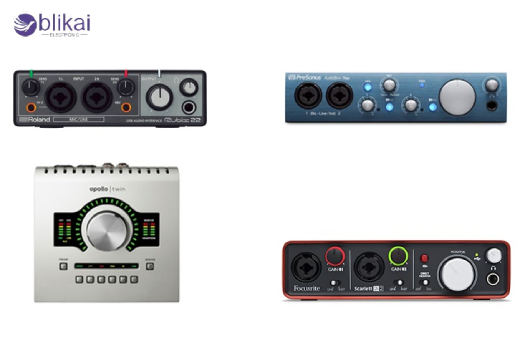
An audio interface is an important hardware interface between the analog sound world and the digital world of computers, digital audio workstations (DAWs), and signal processing systems. Although it is commonly sold as one unit, an audio interface is essentially a combination of components of high-precision electronics, such as analog front-ends, ADCs, DACs, clocking circuits, high-speed data interfaces, and so forth, whose design defines recording and monitoring quality and real-time responsiveness.
How Audio Interfaces Work: Signal Flow Explained
An audio interface internal signal path starts with an analog input section where the signal of a microphone, instrument, or line level is conditioned with impedance matching networks and low noise preamplifiers and then sent to the ADC. The conditioned analog waveform is sampled by the ADC at an attainable fixed sample rate, at a fixed bit depth, to give digital audio data, which is buffered and sent to the host computer using a high-speed digital interface. The digital audio data is sent by the host into the buffering buffer, synchronized to the clock and transformed to analog and then fed to the output drivers, which drive the speakers or headphones, causing each of the stages to add to the latency, noise, and signal quality.
ADC Explained: Analog-to-Digital Conversion
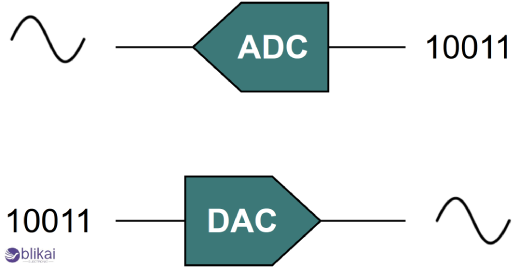
The most important element, which converts continuous analog audio signals into discrete digital samples that can be processed by software, is an analog-to-digital converter (ADC). In audio interfaces, ADCs are optimized for audio bandwidths, dynamic range, and linearity rather than raw sampling speed, using architectures such as sigma-delta modulation to achieve high resolution with manageable clock frequencies.
ADC Key Specifications That Affect Audio Quality
Sample rate, bit depth, dynamic range, signal-to-noise ratio (SNR), and total harmonic distortion and noise (THD +N) are the main parameters that characterize ADC performance of an audio interface. The sample rate defines the maximum reproducible frequency, the bit depth defines the theoretical maximum dynamic range, and the practical SNR is measured by the closeness of the converter to the theoretical limit. High-quality audio interface ADCs can be 24-bit, have up to 192 kHz sample rates, a dynamic range of more than 110 dB, and extremely low distortion, and therefore recorded signals are no longer characterized by converter performance, but by microphones and acoustics.
How ADC Quality Impacts Recording Clarity
Subjective audio clarity of audio recorded is directly correlated with ADC linearity, noise floor, and transient response, particularly when recording vocals, acoustic instruments, or low-level ambient detail. A high-performance ADC preserves micro-dynamics and phase accuracy, preventing subtle distortion that can accumulate during mixing and processing. Bad ADCs cause quantization noise, harmonic distortion, and timing error, which are not immediately visible, but the effects of such errors lower headroom and transparency in complex productions.
DAC Explained: Digital-to-Analog Conversion
The reverse of the ADC is a digital-to-analog converter (DAC), which builds up a continuous analog signal by interpolating between discrete digital samples to be monitored and played. In audio interfaces, DACs are responsible for driving studio monitors, headphones, and external analog equipment with accurate amplitude, timing, and spectral balance.
DAC Performance Parameters to Look For
The dynamic range, linearity, and jitter sensitivity are other significant specifications of DAC, and the design of the output stage determines the perceived sound quality. A high dynamic range ensures clean playback at both high and low volumes, while low jitter sensitivity minimizes timing-related distortion that can blur stereo imaging. The analog output stage following the DAC--often overlooked in marketing materials--plays a major role in determining noise performance, output impedance, and compatibility with professional monitoring equipment.
DAC Influence on Monitoring and Mixing Accuracy
When correctly employed in DACs, tonal balances and spatial data are perceived and dynamic changes are reproduced without any colouration, and mixes will be compatible with the diversity of different playback systems. A poor DAC can exaggerate or mask certain frequencies, distort stereo imaging, or introduce noise that leads to incorrect mixing decisions.
Understanding Latency in Audio Interfaces
Latency of an audio interface is the delay in time that an analog signal input to the system takes before an analog signal is heard as the output of the digital processing. This delay is normally quantified as round-trip latency and represents ADC conversion time, buffering delays, data transmission latency, processing time in the host system and DAC conversion time. Real-time monitoring, live performance and software instruments playback all require low latency.
Main Causes of Audio Latency
The converter group delay and digital buffer size, driver efficiency, and interface bandwidth are the main causes of latency. Whereas the delay in converting ADC and DAC values is generally fixed and relatively small, the settings of buffer size in the driver can greatly increase the overall latency since smaller buffers translate to decreased delay at the expense of increased CPU utilization. USB, Thunderbolt or PCIe interface protocols also have an impact on latency based on variations in bandwidth, protocol overhead and direct memory access capabilities.
How Low Latency Improves Recording Workflow
Low-latency performance allows musicians and engineers to listen to real-time recordings without any apparent delay that is significant in maintaining timing, pitch, and confidence in performance. In virtual instrument workflows, low latency ensures that MIDI input feels responsive and natural. Audio interfaces with optimized drivers and hardware-based monitoring paths enable these low-latency workflows even on modest computer systems.
Drivers, Firmware, and Latency Optimization
High-quality drivers and firmware are required in order to provide low and steady latency in an audio interface since they regulate the scheduling of buffers, data transfer and interchanging with the host operating system. Professional interfaces often provide dedicated ASIO or Core Audio drivers that bypass unnecessary OS layers, reducing overhead and improving timing consistency. Firmware-level optimizations, such as efficient buffering and direct monitoring paths, further reduce latency and improve reliability under heavy workloads.
Audio Interface Connectivity Types Compared
The most used are USB audio interfaces because they are generally compatible with a large number of customers, and in the majority of recording applications, their latency is greater than Thunderbolt or PCIe-based products. Thunderbolt interfaces are less latent and they have more channels, as they can access system memory directly, and the protocol overhead is less. PCIe audio interfaces are designed to be installed in desktop computers. They offer the lowest latency and most stability of any audio interface and are therefore suited to big studios and for measurements.
Clocking and Jitter Control in Audio Interface
Accuracy of Clocking Both ADC and DAC performance are highly dependent on clocking accuracy, which is a source of jitter that is reflected as distortion and lack of stereo precision. Modern audio interfaces use low-jitter crystal oscillators, phase-locked loops (PLLs), and advanced clock distribution schemes to maintain stable sampling rates. There are also professional interfaces that allow external word clock synchronization, which enables two or more digital devices to work harmoniously in complicated studio set-ups.
Choosing the Best Audio Interface for Your Application
The ideal audio interface is determined by the application requirements that demand such functions as channel and number, tolerance to the latency, monitoring accuracy, and integration of the system. Home recording studios are of lesser technology than professional studios as they require ultra-low latency, expandability, and precise clocking. The knowledge of the interaction between ADC and DAC and latency can enable users to choose interfaces on technical considerations and not on market assertions.
Audio Interface Specifications Explained
Although manufacturers usually focus on what they can present on the headline, like the sample rate and the bit depth, these figures do not dictate the actual performance in the real world. Other factors like analog circuit design, quality of power supply and driver optimization are as important. The process of audio interface evaluation involves reading specifications in context and learning about the parameters that are most important in the specific application.
Common Myths About Audio Interfaces
It is often said that a high sample rate is always better for sound, whereas converter quality and analog design are of much greater significance. The other myth is that costly interfaces automatically assure high performance without taking into consideration the driver, system configuration and workflow requirements. The latency is often also misconstrued as either a computer speed phenomenon, a system-level phenomenon, or a combination of both hardware and software.
FAQ
What makes an audio interface the best?
High-quality performance in both ADC and DAC, low round-trip latency, stable drivers, good clocking and well-designed analog circuitry are what constitute the best audio interface as opposed to brand name or sample rate itself.
How important are ADC and DAC quality in an audio interface?
The quality of the ADC defines the degree of sound recording accuracy, and the quality of the DAC defines the degree of sound monitoring; both are required to achieve professional sound production.
Does USB audio interface latency matter for beginners?
Yes. Even beginners benefit from low latency, as high delay negatively affects timing, performance confidence, and learning efficiency.
Can a good audio interface improve sound quality?
Yes. An interface with a good audio interface featuring good converters and analog stages drastically enhances recording quality and monitoring quality over an in-built sound card.
Conclusion
The concepts of ADCs, DACs, and latency are the keys to considering audio interfaces beyond the ever-important surface-level definition. They are the main technologies defining the level of audio interface performance because of the accuracy of sound capturing, reproduction, and experience in real-time. Users are then able to select the most appropriate audio interface to meet their individual technical and creative requirements by investigating at the system-level and not marketing metrics.
Some images are sourced online. Please contact us for removal if any copyright concerns arise.





