


What Is a Motherboard Chipset? Functions & Types Guide
 349
349What Is a Motherboard Chipset?
A motherboard chipset is a set of built-in circuits that are used to control data exchange between the processor and other hardware components in the computer. Instead of making computations like a CPU, the chipset is a traffic controller; it routes data signals between subsystems such that information flows in the right direction and in the most efficient manner. The early design of computers used to have many chips with different duties, but the current chipsets function to have numerous activities under one controller to enhance productivity and reduce latency. The chipset defines which processors may be used in a motherboard, what kind of memory may be added to it, the number of expansion devices to be attached, and what high-speed interfaces may be used, making it a characteristic of motherboard functionality.
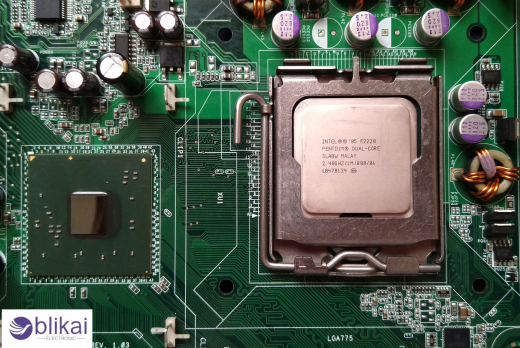
Chipset vs CPU vs Motherboard
The CPU, chipset and the motherboard cooperate, but their uses in a computer system are completely different. The CPU is the brain of the computer since it does the calculations and the instructions of the program, and the motherboard is the physical platform and electrical conduits that link all the components. Between these components is the chipset, which coordinates communication and provides compatibility with hardware. Though the processor defines raw computational performance, capabilities in the system, including expansion options, connectivity standards, and technologies supported, are defined by the chipset.
Main Functions of a Motherboard Chipset
The primary role of a motherboard chipset is to regulate data exchange among system components and ensure coordinated operation between hardware subsystems. It manages communication channels linking the CPU to storage drives, USB devices, graphics interfaces, networking controllers, and audio systems, preventing data conflicts and bottlenecks. The chipset also imposes hardware regulations specified by manufacturers of motherboards, e.g., maximum allowed memory speed or number of PCIe lanes available. The chipset also synchronizes the system resources and input/output functions in such a way that it is capable of offering stable multitasking and also ensures the peripherals are used efficiently without overloading the processor.
CPU Communication Management
Communication pathways between the processor and the peripheral devices are one of the most critical tasks that the chipset is supposed to perform. The modern CPUs directly drive some of the high-speed connections, including primary PCIe graphics lanes and primary memory controllers, but the chipset handles the secondary communication channels, providing other hardware components with an opportunity to communicate with the CPU effectively. This separation of labor eases the processor load and ensures the coherence of the work in case more devices are running, e.g., storage drives transfer files, and USB devices and network interfaces are connected.
Memory Control and Support
Although many memory controller functions have moved into modern CPUs, the chipset still plays a crucial role in defining memory compatibility and system limits. It determines supported RAM configurations, maximum capacity, memory channel layouts, and officially supported speeds based on motherboard design. Chipsets affect either the availability of advanced memory functionality, like overclocked RAM profiles, or error-correcting memory, so anyone wishing to use a high-performance system needs to choose chipsets that support faster memory standards and larger memory capacities.
PCIe Lane Allocation
PCIe lanes are necessary to connect graphics cards, SSDs, and expansion cards, and the chipset design has a major effect on the distribution of such lanes. Although CPUs may include a few direct PCIe lanes for high-speed devices, the chipset includes more lanes that are accessible by storage controllers, network adapters, and other auxiliary expansion ports. The overall amount of lanes available defines the number of high-performance devices that can be run in parallel without any bandwidth constraints, and that is why selecting chipsets is of particular concern to gaming systems, workstations, and content creation PCs that need several expansion devices operating at the same time.
Storage Interface Control
Motherboard chipsets manage storage connectivity by supporting interfaces such as SATA and NVMe, enabling communication between storage drives and the processor. This can be done with advanced chipsets that are able to support RAID configurations, so that multiple drives can be used in tandem with each other to increase the performance, or to act as a backup in case of a system failure. Chipset capabilities determine the number of available storage ports, supported drive speeds, and compatibility with modern SSD technologies, which is why better-quality motherboards tend to boast of increased storage support as a feature.
USB and I/O Connectivity Management
USB ports, onboard network, audio interfaces, and other input/output systems are based on controllers of chipsets. The chipset will also define the number of USB ports supported by the motherboard and what standards the motherboard supports, including USB 3.x or more high-speed interfaces. It is also in charge of communication involving integrated Ethernet and wireless modules, which are connected to ensure that connected devices interact efficiently. Since the present-day computing is greatly dependent on external peripherals, the chipset's I/O capabilities greatly determine the daily usability and the flexibility of the system.
Power and System Management
Chipsets help in the stability of the system as it helps in power management tasks such as sleep states, wake events, and hardware monitoring. They are the coordination of communication between the firmware, operating systems, and hardware controllers in order to maximize energy use and ensure safe operating conditions. Efficient chipset power management improves thermal performance and battery life in portable devices while ensuring desktop systems remain stable during heavy workloads or extended operation.
Types of Motherboard Chipsets
The chipsets on the motherboard have undergone a great transformation over time, leaving behind the multi-chip architecture designs, which are replaced by a highly designed chipset that is more efficient and less latent. The knowledge of the type of chipsets will assist in understanding how modern computers can perform better using fewer physical components. The trend indicates the larger semiconductor move in the direction of integration, miniaturization, and enhanced energy efficiency.
Northbridge and Southbridge Architecture
The older motherboards were designed in a two-chip format, which had a Northbridge and a Southbridge, each handling various communication functions. The Northbridge managed high-speed connections, e.g., communication with CPU, graphics cards and memory access, where the Southbridge managed low-speed peripherals, e.g., storage devices, USB ports, and sound systems. This design was successful with the early PCs but added latency and complexity to the motherboard, which later manufacturers tried to put most of the Northbridge functionality on the CPU.
Platform Controller Hub (PCH)
Modern Intel platform systems substituted the two-chip design with the Platform Controller Hub, which combines most functions of the chipset into one controller that is connected directly to the CPU. Memory and primary graphics communication has now been performed by the processor, and secondary connectivity like USB, storage and networking has been performed by the PCH. This simplified architecture saves on power, improves data efficiency and enables motherboard manufacturers to make smaller and more reliable systems.
System-on-Chip (SoC) Designs
Most of the current laptops and small-sized devices directly incorporate chipset functionality into the processor as a System-on-Chip design. This approach combines CPU cores, graphics processing, memory control, and I/O management within a single semiconductor package, minimizing latency and improving energy efficiency. SoC designs are the most widespread in mobile computers, and the trend towards more integrated hardware architecture is also found in desktops.
Intel vs AMD Chipsets
Both Intel and AMD design lineups of chipsets designed to match the performance level and needs of different users, with each family having different functions and availability of expansion. Intel chipsets are unofficially classified into entry-level, mainstream, and enthusiast, and AMD has a similar tier of determination of features across product lines. The differences between manufacturers are usually related to overclocking support, availability of PCIe lanes and generational compatibility.
Common Problems Related to Chipsets
Chipset-related problems usually entail a conflict of drivers, compatibility issues, overheating or old firmware. Wrong drivers can lead to a failure in connectivity or low performance, and a lack of proper cooling may also result in the system becoming unstable. The compatibility issues are frequently solved with the help of a BIOS update that enhances communication between the components of the system, with the emphasis put on the necessity to update the system software.
Future Trends in Motherboard Chipset Design
The future of chipset development is more on the aspect of greater integration, higher communication standards, and greater power efficiency. Standalone chipsets are also being developed further as dedicated I/O controllers with advanced connectivity technologies as processors begin taking on additional traditional chipset functions. The new trends include increased PCIe generations, support of AI acceleration, and improved power optimization features intended not only for high-performance desktop computers but also for energy-efficient mobile devices.
FAQ
Does the chipset affect gaming performance?
Chipset does not have a direct impact on the FPS but influences gaming in terms of PCIe bandwidth, support of storage speed, compatibility with memory, overclocking, and expansion features.
Can you upgrade or replace a motherboard chipset?
The chipset of a motherboard cannot be upgraded as it is permanently embedded into the hardware of the motherboard, where it will only be replaced by replacing the motherboard itself to enable newer features of the chipset.
Some images are sourced online. Please contact us for removal if any copyright concerns arise.





