


RJ45 Color Code: Everything You Need to Know
 296
296Cables that are tangled. Wires that are confusing. Then there's RJ45. Hidden in plain sight, it's the hero of your internet connection. It's all good, except for the color codes. There's more to them than just a show. The patterns they follow are crucial for the proper functioning of the network. The RJ45 color code is essential for anyone who wants to know what's going on behind their router, whether they are crimping their own Ethernet cables or just interested in understanding what's happening behind their router. This guide breaks it down in a clear and simple manner, without a lot of technical jargon. Take it one wire at a time and let's untangle the mess.
What is an RJ45 Connector?
RJ45 connectors are those small, clicky plugs you probably have on the back of your modem or laptop. A modular connector with 8 positions and 8 contacts is known as an 8P8C connector. It sounds pretty technical, doesn't it? Basically, it is a box that holds eight wires, each color-coded, and arranges them neatly for data transmission. With twisted-pair cables such as Cat5e or Cat6 it can connect your device to a router, switch, or wall outlet for Ethernet networking. Isn't it satisfying when you hear that locking click? It's all by design.
But RJ45 does more than send packets-it does it cleanly, fast, and reliably. Eight little metal contacts transmit electrical signals at high speeds inside. There can be problems if the wires aren't arranged correctly (yep, that's why the color code is so important). In terms of its look, it's simple, but in terms of its function, it's pretty great. Home or office networks are powered by tiny handshakes like this.
RJ45 Color Code
The wires look like colored ones, don't they? But trust me: it's the foundation of error-free, clean Ethernet connections. Is that what those colors are? It's not a random selection. There are two industry standards for this: T568A and T568B. The Ethernet cable's eight wires need to be lined up exactly as they are crimped into the RJ45 connector according to these standards. You'll end up with no connection or worse, a flaky one that drives you crazy if you use the wrong color in the wrong place.
Let's take a look at how it breaks down.
Typically, Ethernet cables have four twisted pairs, making a total of eight wires. There are two color-coded versions of each pair: one solid and one striped. Orange, green, blue, and brown make up the four pairs. These pairs are arranged differently in T568A and T568B wiring standards. Commercial installations tend to use T568B more frequently in the U.S. In residential settings and on federal projects, T568A is often used.
Below is a typical color order for T568B clips (from left to right, clip facing away from you):
-
White/Orange
-
Orange
-
White/Green
-
Blue
-
White/Blue
-
Green
-
White/Brown
-
Brown
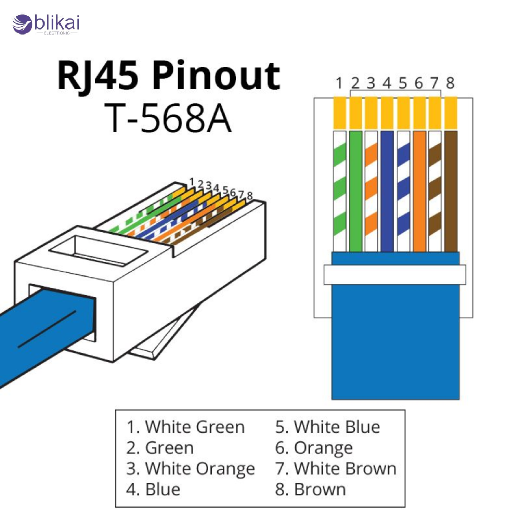
And here’s the T568A order:
-
White/Green
-
Green
-
White/Orange
-
Blue
-
White/Blue
-
Orange
-
White/Brown
-
Brown
The two work equally well. For straight-through cables (for connecting devices to switches and routers), you must stick to one on both ends. The crossover cable can be used in old-school device-to-device setups (like PC-to-PC) if you mix A with B on either side. There's more to the color code than meets the eye. There are eight tiny strands that provide logic, signal integrity, and reliable networking. You can make your network sing if you strip them right, crimp them clean, and make sure they are flat. A blinking "no internet" icon will leave you wondering what went wrong if you get it wrong.
How to Pick Between T568A and T568B?
Let's begin with something simple. In RJ45 connectors, T568A and T568B describe how to arrange the eight wires inside twisted-pair Ethernet cables. It is TIA/EIA that defines both standards. It is just how those colored wires are mapped out that differs between the two. What makes the difference? These are the positions of the green and orange pairs. Other than that? The same. Here's how it works in real life.
T568A
As the original standard, it is still in use. Today's standards remain the same. All federal projects are required to comply with this requirement. In residential wiring, this type of cable is often used. A might be the best option if you're dealing with standardized or older telecom setups. Older telephone wiring systems are better suited to this system. Therefore, if you are working in an Ethernet-enabled setup, T568A may be more suitable.
T568B
The American commercial world uses this one most often. What is your favorite premade Ethernet cable? Wired in T568B. Why? It was just a matter of time before T568B took over when networks exploded in the late '90s and 2000s. Unless you have a good reason not to, choose A if you're going to build or repair standard Ethernet cables for modern routers, switches, or PCs.
So which one should you choose?
The cable can either be built yourself or connected to something pre-wired if you're doing it yourself. Make sure both ends use the same standard. As a result, you will have a straight-through Ethernet cable, which can be used for most Ethernet connections (PCs to routers, switches to modems, etc.). When mixing with existing wiring (like patch panels or in-wall cables), make sure the spacing is the same. In other words, strange things can happen, such as slow data transfer speeds and no connection.
When A is connected to one end of the cable and B to the other, you have created a crossover cable. In the past, these were required for direct device-to-device connections (for example, from a PC to another PC). In modern devices, auto sensing ports are commonplace, so crossover cables aren't really necessary, unless you have some legacy devices.
Faqs
Question 1: What does 45 mean in RG45?
Answer: There is no specific meaning to "45" in RJ45. There is nothing more to it than a designation number. The "RJ" stands for Registered Jack, which is a telecommunications connector standard in the U.S. There are different types of RJ11 in the U.S., RJ14 in the U.S., and RJ45 in the U.K. The Ethernet connector RJ45 consists of eight positions with eight contacts. The "45" is merely a label. That's all.
Question 2: What is RJ45 used for?
Answer: RJ45 is commonly used for data communication and networking. Ethernet cables use this connector to connect computer, router, switch, and modem devices. A high-speed data transfer protocol is also used in LANs (Local Area Networks). Industrial control systems and VoIP phones sometimes use it as well. RJ45s are generally used when data is transmitted over Cat5/Cat6 cables, or if there is wired internet.
Question 3: Is RJ45 copper or fiber?
Answer: It is copper, not fiber, that is used in RJ45 connectors. During Ethernet networking, they are used in conjunction with twisted pair copper cables (such as Cat5e, Cat6, or Cat7). Data can be transmitted over short to medium distances (mostly up to 100 meters) using copper wires. You would use a fiber-optic connector, such as an LC or SC or a MTP/MPO, if you were dealing with fiber-optic cables.
Wrapping Up
To conclude, RJ45 connectors play a crucial role in modern networking, facilitating high-speed data transmission. In order to create smooth, reliable connections, it is important to understand how RJ45 works and its color-coding standards. In spite of its simplicity, it's crucial to maintaining fast, stable internet connections. If you master the wiring process and choose the correct standard, you can design your own Ethernet cable. It is therefore essential to use RJ45 connectors when troubleshooting a network or setting up a new one.
Some images are sourced online. Please contact us for removal if any copyright concerns arise.





