


How to Remove Battery Corrosion: Safe Cleaning & Repair Guide
 239
239What Is Battery Corrosion?
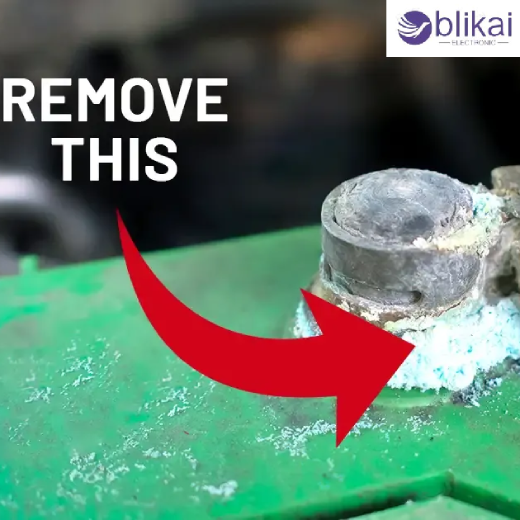
Battery corrosion occurs when chemical substances deposit on the battery contacts, terminals or any conductive metal surface near the battery. They are usually white, blue, green or rusty in color and are the result of electrolyte chemicals leaking out of the battery and mixing with the material surrounding the battery.
Types of Battery Corrosion Deposits
White Powdery Corrosion
The leakage of alkaline batteries is often called “white powder.” The residue is a result of the reaction of potassium hydroxide from the battery with carbon dioxide and moisture in the air. Examples of this type of corrosion include remote controls, toys, flashlights, and portable electronics.
Blue Corrosion
Copper sulfate formation is a common cause of blue corrosion. When acidic gas in the battery is exposed to the copper battery terminals or to the connectors of the battery cables. It is a typical product that is found in cars.
Green Corrosion
A green deposit is formed when copper is oxidized. Moisture and chemical exposure can cause the copper surface to become oxidized over time, which can reduce the conductivity of the copper surface.
Rust-Like Deposits
Rust can be a problem in some battery compartments because they have steel parts in the compartment that are prone to rusting if exposed to leaking electrolyte. Corrosion in battery holders may cause mechanical damage and may be rust-colored.
Safety Precautions Before Cleaning Battery Corrosion
Personal Protective Equipment (PPE)
Do not touch or come into contact with the battery corrosion without wearing protective gloves and safety glasses; potentially harmful chemicals may be present. If you are using larger-sized batteries, wear long sleeves & protective clothing for extra protection.
Tools and Materials Needed
Some useful cleaning equipment consists of a soft-bristle brush, a digital multimeter, microfiber cloths, cotton swabs, baking soda, white vinegar, distilled water, sandpaper, and a digital multimeter. These materials can be used to safely remove corrosion without damaging adjacent parts.
Important Safety Warnings
Disconnect the power before cleaning. Work in a well-ventilated area, and avoid breathing in dust from the deposits of corrosion on the dry surface. Don't repair a battery that is swollen or cracked, or that leaks heavily.
How to Remove Battery Corrosion Step by Step
Step 1 – Turn Off and Disconnect Power
Firstly, turn it off and eliminate all power sources. Carefully remove batteries and examine the battery compartment for damage. If removing the battery from an automotive application, disconnect the negative terminal first and then disconnect the positive terminal.
Step 2 – Inspect the Battery and Terminals
Check the battery, terminals and other parts for leaking, cracking, discoloration or damaged insulation. The knowledge of the origin of corrosion can help in deciding the reusability of the battery or the need for replacement.
Step 3 – Neutralize the Corrosion
The cleaning methods vary depending on the type of battery chemistry. Use a baking soda and water solution to clean lead-acid batteries from acidic deposits. Use a small amount of white vinegar or lemon juice for alkaline chemicals to neutralize them in alkaline battery residue.
Step 4 – Scrub Away Corrosion Deposits
Use a soft brush or an old toothbrush to gently brush off the corrosion. Cotton swabs may help clean around battery contacts and connectors when they are hard to get to. Don't apply excessive force that may cause damage to fragile electrical parts.
Step 5 – Rinse and Dry the Area
Use a soft, damp cloth with distilled water to get rid of any excess water. Dry all surfaces before installing batteries again, to avoid corrosion in the future.
Step 6 – Clean Battery Contacts
If contacts are oxidized, use fine sandpaper or contact cleaning tools to lightly sand them. Cleaning up oxides will enhance the conductivity and facilitate good electrical contact.
Step 7 – Reinstall or Replace the Battery
Clean and check battery status. Replace any leaking, swollen or damaged batteries. If the battery is in good condition, reinstall the battery and then check it to make sure it is working.
How to Remove Corrosion from Different Battery Types
Car Battery Corrosion Removal
Corrosion in automotive batteries is often seen as deposits on the battery terminal posts and cable clamps. A solution of baking soda neutralizes acidic residue, and a wire brush will clean metal surfaces. If the product is cleaned, the application of dielectric grease can decrease corrosion in the future.
AA, AAA, C, and D Battery Corrosion
Many electronic products contain household batteries. Household batteries tend to leak in electronic devices. Remove any residue from battery compartments with a small brush, cotton swabs and a solution of vinegar. Ensure that contacts are cleaned prior to putting in new batteries.
Rechargeable Battery Packs
Typical corrosion is unlikely to occur when using lithium-ion battery packs, but there is a possibility of leakage and/or connector corrosion. Don't puncture or open lithium batteries. Only clean easily accessible terminals and replace broken packs as soon as possible.
Marine and RV Batteries
Marine and RV batteries are installed in damp environments, which favor corrosion. Avoiding issues of reliable operation requires regular cleaning and protection sprays at the terminals and regular inspections.
Testing Battery Performance After Cleaning
Visual Inspection
Once cleaned, check all terminals and contacts for residue, discoloration and physical damage. A surface must be shiny and look free of visible corrosion.
Measuring Voltage with a Multimeter
Use a digital meter to check battery voltage. Determine if a battery is usable or unusable based on voltage measurement and reference to the manufacturer's data.
Checking Terminal Resistance
When there is a high resistance at the battery connections, it may be due to corrosion or poor contact with the battery terminals. Good, clean and secure connections should offer a small amount of resistance.
Load Testing the Battery
A load test is a better way to determine the health of the battery for automotive and larger rechargeable batteries. If the battery load test fails, even though the battery voltage seems normal, the batteries should be replaced.
Common Mistakes to Avoid When Cleaning Battery Corrosion
Mixing Cleaning Chemicals
Mixing various cleaners can cause undesired chemical reactions. Only use the correct neutralizing solution for the battery type that is being serviced.
Using Excessive Water
Excessive water will cause damage to electronic parts and further corrosion. Use only small amounts when cleaning battery compartments.
Cleaning Without Protective Equipment
Irritating chemicals can be found in battery residue. Always use the proper protective equipment when cleaning.
Reusing Leaking Batteries
Once a battery leaks, its reliability is compromised. The use of leaking batteries will result in the repeated possibility of corrosion and damage to the devices.
Ignoring Internal Device Damage
While removing visible corrosion may make the vehicle operational, if this has already damaged interior parts, the vehicle will not be reconditioned. Check all the systems thoroughly.
FAQ
Can Battery Corrosion Ruin Electronics?
Yes. If it progresses, corrosion can contaminate the circuit boards and connectors of electronic equipment, causing damage.
Does Vinegar Remove Battery Corrosion?
Yes. Vinegar is a great way to neutralize alkaline battery residue, and to remove the corrosion deposits in many electronics devices.
Can a Corroded Battery Be Saved?
Leaking, swollen or damaged batteries should be replaced; small amounts of corrosion at the ends of the battery can be cleaned.
Conclusion
Corrosion is a frequent but easily controlled issue that may occur in batteries, terminals, connectors and sensitive electronic components. Hiring a proper Safety Engineer, checking battery performance after cleaning and using the correct cleaning process and methods can help to ensure electrical reliability and extend equipment life. Regularly scheduled inspections, proper storage and timely replacements are still the best ways to prevent corrosion and its impact on electronic systems.
Some images are sourced online. Please contact us for removal if any copyright concerns arise.





