


CH340 Drivers: USB to Serial Adapter Setup, Install & Troubleshoot
 803
803What Is the CH340 USB-to-Serial Driver?
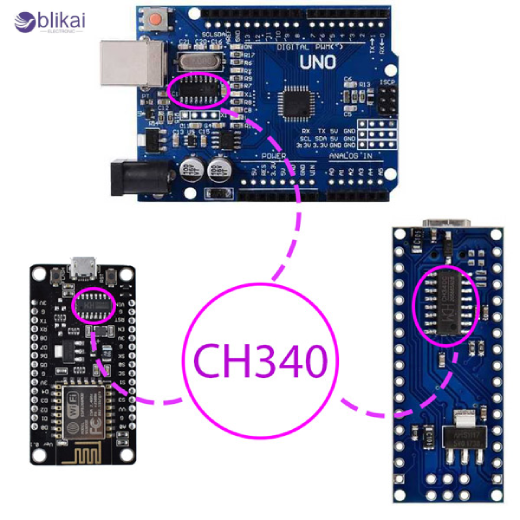
The CH340 USB-to-serial driver is a software interface that allows computers to communicate with devices using the CH340 chip, a cost-effective USB-to-UART bridge widely found in Arduino clones, ESP8266/ESP32 boards, CNC controllers, TTL modules, 3D printers, and embedded development tools. Its family, such as CH340G, CH340C, CH340T, and CH340N, converts PC USB data to serial TX/RX data, which can be read by microcontrollers, making it possible to program microcontrollers, debug and transfer data. Lack of the appropriate driver would prevent the computers from identifying the hardware of CH340 and therefore would miss out on the COM ports, unknown devices and communication errors.
When You Need to Install CH340 Drivers
You need CH340 drivers whenever your computer cannot recognize a device that uses a CH340 USB-serial converter, which commonly appears as “Unknown USB Device” or shows no COM port in Device Manager. These drivers are essential for operating systems that do not include native CH340 support, especially older versions of Windows or macOS, where unsigned kernel extensions may be blocked by default. The majority of cheap Arduino Nano imitations, NodeMCU boards, Wemos D1 Mini, many ESP32 devkits, 3D printer mainboards, laser engravers, and USB-TTL adapters use CH340 chips, which means that the correct drivers need to be installed to upload firmware, use serial monitors, or achieve stable USB communication.
CH340 Driver Installation Guide (Windows)
The CH340 driver installation is usually not very complicated: the user will download the relevant installer, executable file, and observe the installation instructions on the screen. A CH340 connection can also supplement the existing number of ports by providing a new COM port in the Device Manager, which typically appears in the Ports (COM & LPT) list. Where automatic drivers are not installed, one can update the driver manually by clicking on the device under other devices, then clicking on update driver, then giving directions to Windows to the drivers folder. Port conflict may manifest itself in other people, especially when there are many ports; this may be resolved manually, whereby the COM port properties are opened and a new port number selected. Intermittent recognition of the CH340 can also be caused by unrecognized USB signals, faulty cables or overloading USB hubs, which can be overcome by reinstalling the software manually.
CH340 Driver Installation Guide (macOS)
Apple has security restrictions that would make macOS installation more complicated. Once the macOS CH340 package is downloaded, a user has to run the installer and proceed to open System Settings - Privacy and Security immediately to accept the blocked kernel extension, which should be viewed as an unsigned or third-party driver by macOS. This authorisation has to be given within a short period of installation, or the driver will not work. On Apple Silicon (M1/M2/M3) systems, the user might be required to switch on the option of Reduced Security Mode to install third-party USB-serial drivers. After it is installed, the CH340 is visible as a device cu. wchusbserial and serial communication may be made using Arduino IDE, PlatformIO, CoolTerm, or any UART terminal. The driver takes time to boot up and reboot.
CH340 Driver Setup for Linux
Linux distributions already include native CH340 support within the kernel, meaning no driver installation is needed—simply plug in the device and check connection logs via terminal. Most systems create a device entry like /dev/ttyUSB0, which serial tools can access directly. However, permission issues may prevent users from opening the serial port; adding the user to the “dialout” or “uucp” group typically resolves this. Users can verify detection using commands like dmesg | grep tty or lsusb, and when permissions or conflicts arise, udev rules can be adjusted to ensure persistent device naming. Overall, Linux offers one of the most stable environments for CH340 communication.
How to Verify the CH340 Driver Is Working
Driver functionality can be confirmed by checking for an active COM port in Device Manager (Windows), /dev/cu.* entries on macOS, or /dev/ttyUSB0 on Linux. Serial terminals—including PuTTY, TeraTerm, Arduino IDE, and screen commands—should establish stable TX/RX communication if the driver is operating correctly. Performing a loopback test is also helpful: connect the CH340 module’s TX pin to RX and open a terminal; typing any characters should echo them back instantly. If data returns consistently, the USB-serial bridge and driver stack are functioning normally. Delays, lost data, or disconnections indicate driver issues, cable faults, or low-quality CH340 hardware.
Common CH340 Driver Problems & Troubleshooting
CH340 Not Recognized by Windows
In case Windows does not identify the CH340, the device can be seen as an unknown USB device because of the lack of files or untrusted drivers. Resolutions of this kind involve manually configuring Windows to point to the driver, reinstalling the most current package, removing conflicting USB-serial drivers, or changing the USB cables of low quality that do not allow enumeration.
COM Port Not Showing
A failed install or a port conflict normally precipitates a missing port. The user is able to reassign port numbers, delete unused ghost COM ports or re-insert the adapter into another USB controller. Turning off power-saving features on USB hubs may also avoid random disconnections.
macOS Driver Blocked
macOS frequently blocks CH340 drivers due to restricted kernel extension policies. Reactivating the driver requires visiting Security & Privacy immediately after installation, approving the developer, and rebooting the system. Apple Silicon systems may require adjusting security settings before installation.
Upload Failure on Arduino Boards
Failure to upload Arduino programs could be the result of incorrect settings or wrong COM ports, or reversed TX/RX wires of the board. The clones of the Arduino that have CH340 chips are supposed to be selected appropriately in the IDE, and the user must ensure that the CH340 communication is valid with the bootloader firmware of the board.
Device Keeps Disconnecting
Frequent disconnects stem from undervoltage USB ports, faulty cables, cheap hubs, or poorly manufactured CH340 boards. The problem of instability may be resolved by the replacement of the direct USB 2.0 port with a shielded cable or even by an alternative module.
Best Practices for Using CH340 USB-to-Serial Adapters
In a bid to maintain steady communication, one should always use high-quality shielded USB cables and never have long cable runs, which only leads to the degradation of the signal. Ensure that the version of drivers is correct according to the operating system that you are using, and update firmware tools. With bare CH340 modules, it is important to consider the logic voltage (3.3V or 5V) to ensure that the microcontrollers are not damaged and that the connections are not unstable. The act of reconnecting or reloading the module is a possible sign of low-quality counterfeit CH340 chips, which are becoming more and more widespread; the reliance on well-known suppliers significantly minimizes this danger. Also, one should not use CH340 adapters in series by using several unpowered USB hubs, since voltage drops will tend to interrupt the flow of data.
Alternatives to CH340 Drivers
Several competing USB-to-UART bridge chips exist. FT232RL offers excellent stability and broad OS compatibility, but at a much higher cost. Silicon Labs’ CP2102 provides strong macOS and Windows support with simple driver installation, making it popular in commercial development boards. PL2303 is another low-cost option but suffers from compatibility issues on newer Windows versions due to discontinued support for older revisions. Despite these alternatives, the CH340 remains widely used thanks to its affordability, good performance, and availability in countless hobbyist and professional tools.
FAQ
Do I need CH340 drivers for Arduino?
Yes, most inexpensive Arduino Nano, Uno clones, and Pro Mini programming adapters depend on CH340 chips and require drivers—especially on Windows and macOS.
Why does my CH340 device not show a COM port?
Your driver may be missing, corrupted, blocked, or conflicting with other USB-serial drivers. Reinstalling, reassigning ports, or replacing the cable usually solves it.
Are CH340 drivers safe?
The official drivers are secure; however, a third-party bundle can contain malware or old files. Always download sources that can be trusted.
Does macOS still block unsigned CH340 drivers?
Yes, all recent macOS versions require manual approval, and Apple Silicon systems may need reduced security settings for driver loading.
Can Linux use CH340 without installation?
Yes, Linux kernels include built-in CH340 support, so no external driver is needed.
CH340 vs CP2102 — which is better?
CH340 is less expensive and more popular, whereas CP2102 is more cross-platform stable. They are both good subjects for the budget and use.
Some images are sourced online. Please contact us for removal if any copyright concerns arise.





