


Universal Serial Bus (USB) Definition: How USB Works
 82
82What Is a Universal Serial Bus (USB)?
Universal Serial Bus, also referred to as USB, is a standard interface in the industry to be used in connecting electronic devices to communicate and provide power. USB outlines the physical connectors, electrical properties, communication protocols and data formats that need to be used by devices to communicate information reliably. In contrast to the previous interfaces, which posed a difficulty in configuring them manually, USB has the benefit of automatic device detection and configuration and hence is user-friendly and technically efficient.
How USB Works (Basic Principles)
USB is based on the host-controlled communication model that provides a central host device (usually a computer, laptop or embedded controller) to control all the data transfers. Peripheral devices like printers, storage drives or sensors do not have to communicate with one another; they are responsive to commands given by the host. This architecture ensures predictable data flow, controlled bandwidth allocation, and simplified error handling.
Main Components of a USB System
A USB system comprises a host controller, one or more USB devices, connecting cables and optional hubs. The host controller also controls communication, and it is the host that initiates the communication. The USB device is also responsive to requests, the cable carries the data and power lines, and the hubs multiply one USB port into several downstream connections. All the elements have a particular importance in keeping communication stable and standard.
USB Data Transfer Types
USB supports several data transfer modes optimized for different applications. Control transfers are used for device configuration and command exchange. Bulk transfers handle large data blocks without strict timing requirements, such as file transfers to storage devices. Interrupt transfers are meant to be used when dealing with low-latency communication with devices such as keyboards and mice. Isochronous transfers provide continuous data streams with guaranteed timing, commonly used for audio and video devices.
USB Power Delivery Explained
USB can also provide power to the devices that are connected, besides transmitting data. The USB standards are traditional and offer fixed voltage and current levels that can be used with low-power peripherals. Modern implementations support advanced power negotiation, allowing devices to request higher power levels for fast charging or powering complex electronics. This dual function of data and power makes USB highly efficient for portable and embedded systems.
USB Versions and Standards
The USB technology has been developed in a series of generations to accommodate growing data speed and power requirements. Initial standards were based on simple connection, which was eventually succeeded by high-speed data transmission, enhanced power handling and backward compatibility in later standards. The successive generations add to the previous generations, making sure that the older devices can still work with the newer hosts under most circumstances.
Common USB Connector Types
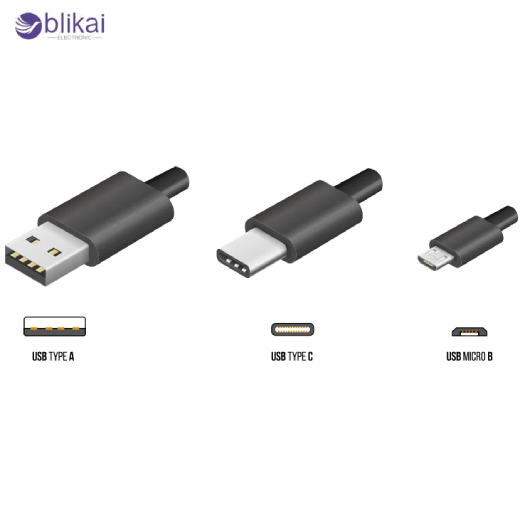
USB connectors are of different physical designs to fit the diverse sizes and applications of devices. Computers are normally connected using traditional rectangular connectors, and smaller connectors were designed to be used with portable electronics. Newer reversible connector designs are easier to insert and provide higher data and power levels, and are usable with current consumer and industrial appliances.
USB Protocol and Communication Process
Upon connection of a USB device, the host starts a process called enumeration with the aim of identifying the device and assigning it an address. In the process, the device offers descriptors that explain its capabilities, power requirements and the communication modes that it supports. As soon as enumeration is finished, structured packets with error checking and flow control can be used to initiate normal data transfer.
Advantages and Disadvantages of USB
The benefits of USB are many, and they include plug and play, ubiquitous compatibility, common power delivery and data speeds that are scalable. It is also, however, limited in other ways, which include: host dependency, cable length limits and possible bottlenecks in shared bus arrangements. Long-term knowledge of these trade-offs assists engineers in selecting an appropriate interface for particular applications.
Typical USB Applications
USB in Consumer Electronics
USB is common in consumer electronics like smartphones, tablets, laptops, digital cameras and external storage devices that are external. It allows quick synchronization of data, updates on firmware, connection to peripherals and charge batteries, hence becoming a universal interface to common electronic devices.
USB in Computer Peripherals
USB is a sure method of connecting to host systems mainly by keyboards, mice, printers, scanners, webcams and external hard drives. The USB device is a plug-and-play device, and this implies that these devices can be connected instantly and be identified without any coding or reconfiguration.
USB in Industrial and Embedded Systems
USB is widely employed in the automation of industrial equipment and embedded electronics in device configuration, diagnostics, data logging, and flashing of firmware. Many microcontrollers and development boards integrate USB interfaces to simplify programming and debugging during product development.
USB in IoT and Smart Devices
USB is significant in IoT and smart devices as it offers a convenient method of supplying power, data exchange, and setting up the device. It is commonly used in its first configuration, maintenance and local communication with sensors, gateways and smart controllers.
USB for Data Storage and File Transfer
USB flash drives, external solid-state drives, and portable hard drives are made with USB, which efficiently transfers a lot of data. The bulk transfer mode enables the secure movement of files across systems, and therefore, USB storage devices are needed in case of backup, software sharing, and portability of data.
USB for Charging and Power-Only Applications
Many USB connections are used exclusively for power delivery, such as charging smartphones, wireless earbuds, power banks, and portable tools. USB has the capability to transfer more power safely with modern standards of power negotiation to facilitate fast charging and the operation of devices.
USB in Audio and Video Devices
USB is usually applied in audio interfaces, microphones, headsets, webcams, and video capture devices. Isochronous data transfer supports the streaming of audio and video in real-time with predictable timing, which is highly important in the process of recording media and real-time communication.
USB in Automotive and Transportation Systems
USB ports are applied in infotainment systems, smartphone integration of smartphones, navigation updates and charging of passenger devices in automotive and transportation environments. USB provides a standardized and reliable interface suitable for both data exchange and power delivery inside vehicles.
USB in Testing, Measurement, and Debugging
USB is widely used in electronic testing and measurement equipment such as oscilloscopes, logic analyzers, and diagnostic tools. It gives an easy access interface for acquiring data, controlling and real-time monitoring of data between a host computer.
USB in Education and Development Platforms
Educational kits, evaluation boards, and development platforms use USB for programming, communication, and power supply. This contributes to making USB a perfect interface to study electronics, prototyping, and to develop a product fast.
Common USB Problems and Troubleshooting
Although it is reliable, a USB may have problems, including the inability to detect the device, a lack of power delivery, or unreliable data transfer. Such are commonly brought about by damaged cables, incompatibility standards, driver bugs or power constraints. The systematic troubleshooting is generally done to verify cables, ports, power needs and compatibility of the software.
Future of USB Technology
The future of USB is concentrated on the larger data throughput, power delivery and compatibility across the board. As the devices require increased levels of communication and power efficiency, USB is also being designed to accommodate emerging technologies, remaining backward compatible. This continues to make USB a platform interface in electronics and computing.
Conclusion
Universal Serial Bus (USB) has transformed the manner in which electronic devices communicate and get power. USB offers a stable and effective communications system to the current electronic systems by integrating standardized connectors, adaptable communication protocols, and scalable power distribution. The functionality of USB is critical to everybody in the field of electronics design, troubleshooting, or integration of technology.
FAQ
What is the difference between USB versions?
The various versions of USB differ regarding speed of data transfer, power capability and functionality. The new ones are compatible with older devices but can work at a lower performance.
What are the advantages of USB over older interfaces?
USB is easier to use, has standardized connectors, automatic configuration and integrated power support and data than legacy interfaces, plug-and-play, and is flexible.
Can a USB be used without data transfer?
USB may also be used in purely power applications, e.g., charging devices. There are numerous USB cables and ports that communicate no data but are designed to be used for charging.
Some images are sourced online. Please contact us for removal if any copyright concerns arise.





