


Graphics Card Repair: GPU Components, Fault Diagnosis Guide
 941
941Introduction to Graphics Card Repair
Modern graphics cards are no longer simple display adapters but highly integrated electronic systems combining advanced semiconductor logic, high-speed memory arrays, multilayer PCBs, and complex power regulation circuits, making graphics card repair a discipline that blends electronics engineering with thermal and signal integrity analysis. The thermal fatigue, unstable power delivery, aging, and mechanical stress may lead to the appearance of GPU failures, and the details of the interactions between each subsystem are important to diagnose the fault properly.
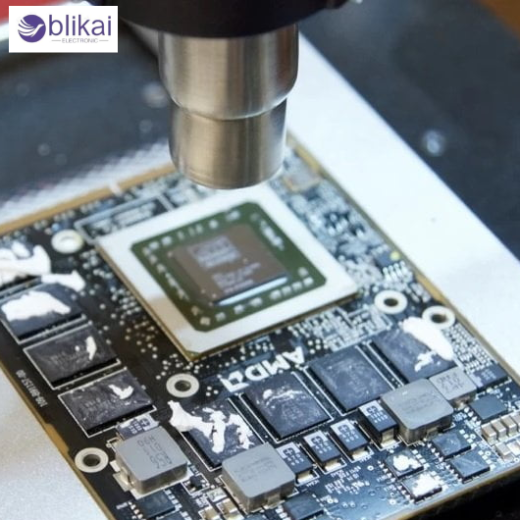
Basic Architecture of a Graphics Card
GPU Die and Silicon Processing Core
The graphics card is a CPU core consisting of the graphics card CPU die, a semiconductor component manufactured using cutting-edge semiconductor technology and attached to the PCB by a BGA (Ball Grid Array) package, which performs thousands of parallel computations each graphics draw and computer task. GPU core failures may also occur as either a complete no-boot situation or a hard system lock-up (sometimes leading to system crash) or extreme graphical corruption, usually as a result of broken solder pads either through repeated thermal cycling or internal silicon damage caused by prolonged overheating.
Video Memory (VRAM) Components
Graphics card VRAM, which is usually GDDR6 or GDDR6X, is packaged as a series of memory chips around the GPU core and tied together with high-speed, impedance-controllable traces, resulting in memory failures being a common cause of artifacting, texture corruption and application crashes. Defective VRAM chips can produce repeatable visual patterns, colored blocks, or driver-level memory access errors, especially under load, and distinguishing between memory IC failure and memory controller issues inside the GPU is a critical diagnostic step.
Power Delivery System (VRM)
The voltage regulation module (VRM) converts 12V input power from the PCIe slot and auxiliary connectors into multiple low-voltage, high-current rails required by the GPU core, memory, and I/O logic, using a combination of MOSFETs, inductors, drivers, and capacitors. VRM-related failures are one of the easiest types of GPUs to repair, and are usually due to shorted MOSFETs, dried or failed capacitors, or broken inductors, and normally lead to no power-up, instant shutdown, or excessive heat around the power stages.
PCIe Interface and Signal Path
The PCI Express interface serves as the communication bridge between the graphics card and the motherboard, relying on high-speed differential signaling across the edge connector and internal PCB traces. The defects of the PCIe are that the system should not identify the graphics card, that there is a slight disconnection during the loading of the system, or fewer lanes are used, typically in the form of oxidized contacts, broken solder connections around the connector, or broken signal traces.
Common Graphics Card Failure Symptoms
No Display or Black Screen
One of the most common repair complaints of a GPU is that there is no display, and this can be a result of a total power outage, non-functionality of the core of the GPU, malfunctioning of the BIOS firmware, or communication errors in the PCIe. To ensure a black screen is diagnosed, the behavior of fans, presence of power rails and detection of the motherboard are confirmed, and the death of the GPU should only be considered after all other possibilities have been ruled out, including shorted VRMs (that prevent the card from booting at all) or the lack of auxiliary (or auxiliary-only) power.
Artifacting, Glitches, and Screen Distortion
Color block, flickering texture patterns, and random lines are typical signs of a VRAM unstable condition or a malfunction of the memory controller and are often aggravated by high temperatures during gaming or rendering applications. These symptoms can be quite progressive and begin with minor glitches and then turn to serious corruption, and can offer a good clue when compared with thermal behaviour and load conditions.
System Crashes and Driver Errors
Crashes when under a load on the graphics card or when loading a driver can be signs of marginal hardware performance, and not necessarily software bugs, particularly the blue screen or message about a driver crash. Hardware-induced driver errors often correlate with unstable voltage rails, failing VRAM, or overheating components, and logs alone are insufficient without physical testing.
Overheating and Fan-Related Issues
Heat-related problems are the number one cause of graphics card failure, typically due to the dried thermal paste or clogged heatsinks or ineffective cooling fans that cause a lack of airflow in the area and localized areas of heat to form. Solder fatigue is a value accelerator that is deteriorated by long-term overheating, which has a detrimental impact on semiconductor junctions and causes stress on power components. The intermittent cooling loss may also be caused by the fan controller fault or bearing failures that result in unpredictable system behaviour.
Step-by-Step GPU Fault Diagnosis Process
Visual Inspection and Physical Damage Check
A physical examination of the gel point device can be carried out as the initial stage of the diagnostic process of the graphics card under adequate lighting and magnifying glasses, with an examination of burns, broken elements, puffed capacitors, detached pads, and corrosion due to exposure to moisture. The failure mode is frequently made immediately apparent by physical damage, e.g., a blown MOSFET, overheated PCB area, etc., and can be used to prioritize further electrical tests.
Power Rail Testing with Multimeter
Measuring resistance and voltage on GPU power rails provides immediate insight into short circuits, open circuits, or missing supply conditions, making it one of the most effective diagnostic techniques. A shortened core or memory rail often indicates failed MOSFETs or internal GPU damage, while absent voltages may point to controller or enable-signal issues.
Thermal Testing and Infrared Diagnosis
Infrared cameras or temperature sensors can be used to do thermal analysis to help technicians locate abnormal hotspots that expose shorted components or inefficient power conversion. Freeze spray and controlled heating can be used to provoke or suppress faults, helping isolate intermittent issues related to solder joints or marginal ICs. Thermal diagnostics is especially useful when searching for defective VRAM chips or power stages that have not been damaged visually.
BIOS and Firmware Verification
A corrupted or incompatible GPU BIOS can prevent proper initialization, resulting in no display or driver failure despite otherwise healthy hardware. Checking the integrity of BIOS and re-flashing with a valid firmware version is a non-invasive repair procedure that is recommended to be undertaken prior to undertaking complicated hardware work.
Repair Techniques for Graphics Card Components
GPU Reflow vs Reballing
GPU reflow entails a reheating of the existing solder joints to regain connectivity, whereas reballing replaces the solder balls completely and will have high long-term reliability in cases where failure of BGA joints has been established. Reflow may provide temporary results, but it does not address underlying solder degradation, whereas reballing is labor-intensive and requires specialized equipment.
VRAM Chip Replacement
Defective chips of VRAM are difficult to replace, as the defective IC has to be carefully identified, removed with the help of controlled hot air, and installed with precise alignment (to preserve signal integrity). Replacement of the memory can completely recover the functionality in the case that the artifacts are separated from the dedicated chips, but not properly soldered or not matched with matching memory specifications, which may create additional faults.
VRM Component Repair
A typical repair performed by VRM is the replacement of shortened MOSFETs, failed drivers, or damaged capacitors and is one of the cheapest ways to repair GPUs when done properly. Equality of electrical properties is essential, including voltage rating, current carrying capacity and switching speed to guarantee constant functioning. Once repaired, then long- term stability has to be tested by extensive load testing.
Cooling System Restoration
The cleaning of dust accumulation, changing of thermal paste and pads, and changing or fixing fans are also a part of the cooling system restoration to provide a steady supply of air to the GPU and VRM parts. Proper thermal interface materials and pad thickness selection are essential to maintain even pressure and effective heat transfer.
FAQ
Can a dead graphics card be repaired?
However, a dead graphics card can sometimes be refurbished, depending on the cause of the failure (power delivery, VRM component, corrupted BIOS or defective VRAM), but repair is not possible when the core silicon of the graphics card is damaged.
What causes most GPU failures?
The majority of the failed GPUs are due to long term over heating, unstable power supplies, fatigue on the solder joints in the thermal cycling and old age capacitors or MOSFETs in the VRM circuitry.
How do you test a graphics card for faults?
Graphics cards are tested by combining visual inspection, power rail measurements with a multimeter, thermal analysis to detect hotspots, BIOS verification, and controlled load testing to reproduce faults.
How long does a repaired graphics card last?
The lifespan of a graphics card is also dependent on the underlying component condition; therefore, a graphics card with a well-done repair may last months to years, depending on the quality of repair, cooling efficiency, and operating environment. However, the lifespan may vary depending on the underlying condition of the component.
Conclusion
Repair of a graphics card is a complicated yet not impossible task when one has a clear insight into the structure of the GPU, the sources of failure that are likely to occur and the methodical processes of diagnosis. Technicians can consider the component-level analysis instead of assumptions, which allows detecting repairable faults and restoring functionality without causing an unwarranted rework. With proper tools, thermal management, and preventive maintenance, many graphics card failures can be resolved effectively and sustainably.
Some images are sourced online. Please contact us for removal if any copyright concerns arise.





