


What Is a Graphics Card? GPU Function, Components & Applications
 480
480Introduction to Graphics Cards
A graphics card, also known as a graphics processing unit (GPU), is a specialized electronic component designed to process and render visual data for display devices such as monitors, televisions, and VR headsets. Graphics cards in contemporary computing systems no longer serve the purpose of drawing images on a screen. They have now been developed into high parallel processors that are able to accelerate complex mathematical operations, multimedia workloads and artificial intelligence tasks.
The paper will give a detailed description of the definition of a graphics card, its functionality, internal functionality, and practical uses in the real world in areas like gaming, professional visualization, and high-performance computing.
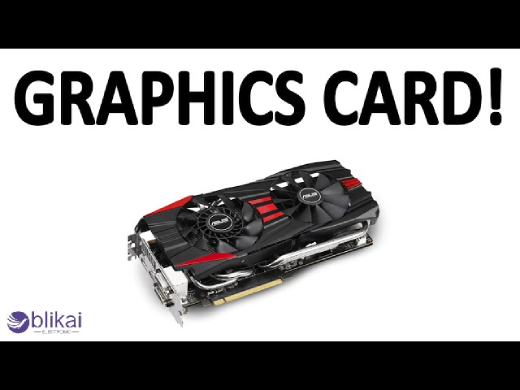
What Does a Graphics Card Do? (GPU Function Explained)
How a GPU Processes Graphics Data
A graphics card is at the heart of a graphics card translator, and it transforms the raw data into images that can be put on a screen. It includes working with geometrical computations, texture effecting, light effects, and the shade of pixels. In contrast to CPUs, where operations are executed in a sequential manner, GPUs are designed to execute thousands of minor operations at once.
When a game or a graphical application provides the computer with instructions and information (object positions, textures, shaders, etc.), the CPU transmits it to the GPU. These operations are then performed using a large number of cores on the GPU, greatly accelerating the process of rendering and allowing smooth and real-time graphics.
GPU vs CPU: Functional Differences
Although both GPUs and CPUs are processors, they are very different in terms of architecture and functionality. CPUs are designed to run low-latency, expensive programs, and are well-suited to logic-intensive programs, running system administration and decision-making. Instead, GPUs focus on throughput and parallelism so that they are best suited to problems that have large datasets and repeat periods.
A modern professional graphical processing unit can include thousands of specialized processing cores, compared to only a few and highly complex cores present in a CPU. This architectural difference explains why GPUs outperform CPUs in graphics rendering, image processing, and machine learning workloads.
Main Components of a Graphics Card
Graphics Processing Unit (GPU Chip)
The graphics card is made up of the GPU chip. It is a complicated semiconductor chip with billions of transistors organized into processing cores, cache memory and control logic. These cores are responsible for executing shader programs, compute workloads, and graphics pipelines.
The new generation of GPUs is fabricated through more sophisticated fabrication techniques, which allow the GPUs to be more performative, energy efficient and dense in the number of transistors. The graphics card is defined by the computational power of the graphics card's inside chip, which is the GPU chip.
Video Memory (VRAM)
Video memory or VRAM is a graphical data memory, which includes textures, frame buffers, and shader information. VRAM is also optimized, in comparison with the system RAM, to access high-bandwidth and high-speed data, which enables the GPU to access large quantities of data very fast.
Common VRAM types include GDDR6, GDDR6X, and high-bandwidth memory (HBM). VRAM capacity and speed are direct measures of performance, and thus are important in high-resolution gaming and professional applications.
Power Delivery System (VRM)
The voltage regulation module (VRM) stabilizes power to the GPU and the memory and supplies it with the correct power. It comprises an arrangement of electronic components such as MOSFETs, inductors and capacitors (to convert the power delivered in the power supply unit) into a convenient voltage.
The right VRM design is important to maintain the performance, remove instability and add other features such as overclocking.
Cooling System
The amount of heat produced by graphics cards is tremendous because of the high concentration of transistors and the consumption of power. Graphics cards are also equipped with cooling to cope with this heat, and this cooling could comprise heat sinks, fans, heat pipes or liquid cooling.
An effective cooling system enhances performance, increases the life of parts and will not be affected by thermal throttling during heavy workloads.
PCB and Supporting Electronic Components
The PCB gives the graphics card mechanical support and the electrical connections among the graphics card, memory, and power components and interfaces. Modern graphics cards are designed using multi-layered PCBs to maintain signal integrity, reduce electromagnetic interference, and support high-speed transmission of data.
How a Graphics Card Works (Step-by-Step)
Input Data from CPU and System Memory
When the CPU gives the instructions and data to the graphics card through the PCI Express interface, this marks the beginning of the rendering process. This data comprises geometry data, textures, and command data to render.
GPU Processing and Rendering
The pipeline used in the GPU to process this data includes the geometry processing, rasterization processing, pixel shading processing and post-processing effects. All stages can be executed in parallel, and the GPU can process millions of pixels per frame.
Output to Display Interface
Once rendering is complete, the final image is sent to the display through output interfaces such as HDMI or DisplayPort. The GPU synchronizes frame delivery to ensure smooth visuals and prevent screen tearing.
Types of Graphics Cards
Integrated Graphics (iGPU)
Integrated graphics are built into the CPU or system-on-chip (SoC) and share system memory. Integrated graphics, though consuming less power and being cheaper than dedicated graphics cards, have lower performance.
Integrated graphics will fit in normal life activities like web browsing, office work, and playing media.
Dedicated / Discrete Graphics Cards
Discrete graphics cards are independent hardware units that have both a graphics processor and VRAM. They offer much more performance and are needed in gaming, content creation and professional workloads.
These graphics cards are mounted via the PCIe slots and have special power connectors.
Professional GPUs vs Consumer GPUs
Professional GPUs are targeted to be used in CAD, 3D modeling, and scientific computing. They also focus on reliability, accuracy and certified drivers, unlike the consumer GPUs, which focus on gaming performance and low prices.
Applications of Graphics Cards
Gaming and Real-Time Rendering
Graphics cards enable realistic visuals, high frame rates, and advanced effects such as ray tracing in modern games. Real-time rendering in high resolutions with a weak GPU would be impossible.
Video Editing and Content Creation
GPUs are used in video production and graphics design to increase rendering and effects processing speed. There are numerous innovative applications that are based very much on GPU acceleration to save time in the workflow.
AI, Machine Learning, and Deep Learning
The popular use of GPUs in artificial intelligence is because it is capable of handling large volumes of data simultaneously. Neural network training and inference are tasks that can greatly benefit from the acceleration of the CPU using a GPU.
Scientific Computing and Simulation
In research and engineering, GPUs are used for simulations, data analysis, and numerical modeling. Their parallel architecture enables faster computation in fields such as physics, chemistry, and climate science.
Cryptocurrency Mining
Graphics cards have the capability of doing cryptographic computations effectively and hence can be used to mine cryptocurrencies. Although this was not their initial application, this usage demonstrates the computing capability of GPUs.
Graphics Card Interfaces and Connectivity
PCI Express (PCIe) Interface
The graphics card is attached to the motherboard via the PCIe interface, which defines the bandwidth of the data transfer. The later PCIe versions are faster, which minimizes the bottlenecks during data-oriented programs.
Display Output Interfaces
Display output is commonly provided in HDMI, DisplayPort and USB-C. These interfaces are capable of high resolutions, refresh rates and higher features like HDR and adaptive synchronization.
Power Consumption and Efficiency
TDP Explained
Graphics cards have Thermal Design Power (TDP), which refers to the level of heat that the card produces when it is loaded. It assists the users with the selection of the right cooling and power supply solutions.
Power Connectors and PSU Requirements
Power cards with high performance demand extra power connections from the PSU. This is necessary to ensure the stability of the system in terms of power delivery.
Performance-per-Watt Trends
The current designs of GPUs are aimed at optimizing the performance-per-watt ratio, which provides enhanced computational performance at low energy use.
How to Choose the Right Graphics Card
Performance Requirements
The selection of a graphics card is based on purpose, such as intended gaming, professional or general computing.
Compatibility with Motherboard and PSU
The physical size, PCIe compatibility and power needs have to be taken into consideration in order to have a fit system.
Budget vs Use Case
It is important to balance between cost and performance. High-end GPUs are also unnecessary for not all users, and the model choice prevents unnecessary spending.
Common Graphics Card Problems and Limitations
Thermal Throttling
Overheating may slow down the performance of the graphics, such as the CPU, in order to avoid overheating. This can be overcome by proper cooling.
Driver Issues
Mismatched or old drivers might bring about software instability and a reduction in performance.
Bottlenecking with CPU or Memory
A powerful GPU may be limited by a weak CPU or insufficient system memory, reducing overall performance.
FAQs
Is a GPU the same as a graphics card?
The graphics card contains a graphics card, which has a graphics card as the primary processor but consists of the graphics card + memory and power circuitry, cooling, and interfaces.
How long does a graphics card last?
A graphics card generally has a lifespan of a few years, as per usage, cooling and technology.
What happens if a computer has no GPU?
A computer will not be able to display visual output without a GPU. Most systems rely on either integrated or dedicated graphics to function properly.
Conclusion
A graphics card is much beyond a display unit- it is a robust electronic machine fitted with parallel processing on a large scale. With an idea of how GPUs operate and the internal elements of the gadgets and their uses, users can make wise judgments when designing or updating the computer systems. Graphics cards will also be an essential part of present-day computing, as software will still be moving towards more and more graphical sophistication and data parallelism.
Some images are sourced online. Please contact us for removal if any copyright concerns arise.





