


How to Test a Surge Suppressor with Multimeter [Electronics Guide]
 1063
1063Introduction
A surge protector keeps electronic devices protected from high voltage that sometimes occurs during lightning or problems with the power grid. Such unpredictable causes can harm or completely ruin electronics unless they are properly protected. Eventually, due to ongoing surges or wear inside, a surge suppressor might not function as well which means you have to check it every now and then. A broken surge suppressor can let power anomalies reach your electronics which can cause damage. This guide tells you how to use a multimeter to check that your surge suppressor is active and safe for your home or office.
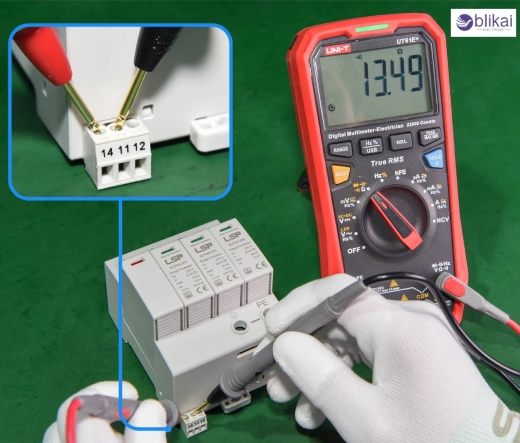
What Is a Surge Suppressor?
The main job of a surge suppressor is to defend your equipment from power surges. It shields connected devices from unexpected excess voltage, often using parts called Metal Oxide Varistors (MOVs). When you have a surge, these MOVs use the excess energy rather than passing it to your electronics. While basic power strips just offer extra outlets, surge suppressors use special systems to respond to voltage increases caused by surges. Such devices as computers, TVs, game consoles and network equipment greatly benefit from the protection of these cords. Receiving the tiniest burst of extra energy from the wall outlet can burn out these devices if there is no working surge suppressor.
Signs Your Surge Suppressor May Be Failing
There are several indicators that your surge suppressor may no longer be providing effective protection:
Connected devices are not receiving power: If your devices fail to power on or shut off unexpectedly, the suppressor may be compromised.
Physical damage such as burn marks or melting: These visible signs indicate overheating or internal electrical faults that have damaged the unit.
Tripped circuit breaker or fuse: Frequent tripping can suggest internal damage to the suppressor’s circuitry or an inability to manage power surges.
Surge protection indicator light is off (if present): Many suppressors have a status light that indicates whether surge protection is active. If this light goes out or doesn’t come on when plugged in, the suppressor may no longer offer protection.
Unusual noises or smells: A humming sound, crackling, or a burning smell are signs of internal failure and should not be ignored.
Tools Needed to Test a Surge Suppressor
To properly test your surge suppressor, you'll need the following tools:
Digital Multimeter (DMM): It is important to check these because they reveal changes in the device’s voltage, resistance and continuity.
Screwdriver: Many suppressors can be taken apart and a screwdriver can let you inspect the inside components if it’s safe to do so.
Safety gloves and goggles: They're necessary to help with electrical shock or accidents caused by broken corridors.
Non-conductive work surface: Being on an insulated surface cuts your risk of getting shocked as you test the device.
Check that every tool is in good condition before you begin. Replace batteries in the multimeter if they need replacing and check all probes and connectors for signs of wear.
Safety Precautions Before Testing
Before beginning any tests, it is essential to prioritize safety. Follow these precautions:
Ensure the surge suppressor is unplugged: Don’t open up or check the internal corridor of an active surge protection unless you're just measuring the affair on it.
Avoid working in damp or wet environments: Electrical shock is more likely if your hands are wettish and it can make accurate readings delicate.
Wear protective gloves and eye protection: Indeed low-voltage electrical systems can beget becks or injuries if a commodity goes wrong.
Verify your multimeter is functioning properly: Test it on a known working circuit before use to confirm its delicacy and trustability.
Be cautious of capacitors: Some launch suppressors may have capacitors that store charge; discharge them duly before working inside the device.
Step-by-Step Guide: How to Test a Surge Suppressor with a Multimeter
a. Visual Inspection
Start with a thorough visual check:
Look for burn marks or melted plastic: This shows overheating or failure inside the device possibly due to a surge in the power.
Inspect the power cord and plug: Check the cables for wear and tear, any change in color or egregious damage to the sequestration, as this might beget a short circuit.
Check for swelling or discoloration: If the MOV or any other element is burned or swollen, it proves that the element has had problems with heat or electricity ahead.
Examine indicator lights: If you have LEDs in your unit, check if they are dim, flickering or not working, since this could suggest surge protection is gone.
b. Continuity Test
This test checks if electrical current can flow through the surge suppressor:
1. Set the multimeter to the continuity setting (often symbolized by a diode or sound wave icon).
2. Insert one probe into the input plug (live or neutral) and the other into the corresponding output socket.
3. A beep or digital readout indicates continuity. No reading or an open circuit reading means the internal circuit is broken, and the unit is no longer functional.
4. Test both live and neutral paths separately for more accurate results.
c. Voltage Test
To confirm the suppressor is delivering proper voltage:
1. Plug the surge suppressor into a known working outlet.
2. Set the multimeter to measure AC voltage (usually marked "V\~").
3. Slip the probes into the outlet pots on the surge protector and try not to touch the tip of one probe to the tip of the other.
4. For North America, the right voltage is 110–120V and for Europe or Asia it should be 220–240V.
5. In the case of low or missing voltage, some parts inside the fridge may have been harmed or disconnected.
d. MOV Testing (Advanced)
MOVs are the heart of a surge suppressor. To test them:
1. If the surge suppressor can be safely opened, locate the MOVs — typically disc-shaped components mounted to the circuit board.
2. Set the multimeter to resistance mode (Ohms).
3. Place the probes on the two leads of the MOV.
4. A functional MOV should show moderate resistance when measured. Infinite resistance (open circuit) or zero resistance (short circuit) indicates failure.
5. Repeat for all MOVs present in the unit, as damage to one often suggests the others may also be compromised.
Understanding Your Test Results
Once you've completed the tests, here's how to interpret the results:
Continuity Present: The internal circuit is intact, allowing current to pass through the device without interruption.
Correct Voltage Reading: Confirms that power is being delivered properly through the suppressor, indicating that at least basic functionality is present.
MOV Test Shows Damage: A failed MOV means that while the suppressor may still pass power, it can no longer protect against surges. This is a critical failure mode, and the device should be replaced immediately.
Inconsistent Results: If you get different readings during multiple tests, this may indicate intermittent faults or demoralized factors. It's safer to replace the unit in similar cases.
When to Replace Your Surge Suppressor
Surge suppressors are not lifetime devices. Here are times when replacement is necessary:
No continuity or voltage output: Indicates a failed internal circuit, likely due to severe surge damage.
Visible damage or burnt components: Signs of past surges or overheating can weaken or destroy internal protection mechanisms.
MOV shows infinite resistance: The MOV has absorbed a surge and failed; the unit no longer offers protection.
Age over 3–5 years: Even without visible damage, the components degrade over time, especially if exposed to multiple surges.
After a major surge event: One large surge can permanently damage the protection components, even if the unit appears to work normally afterward.
Warranty or protection indicator expired: Some units have a limited protection lifespan, often marked on the packaging or manual.
FAQs
Q: Can all surge suppressors be tested this way?
A: Basic and mid-range models can be tested with a multimeter. Some advanced surge defenders may have erected- in diagnostics, tone- test circuits, or covering systems that bear further technical tools or professional examination.
Q: What if my multimeter gives fluctuating readings?
A: First, replace the multimeter battery and check your examinations. oscillations can also affect unstable power force, eroded connections, or loose cables. Be sure you're using a reliable outlet and maintaining firm probe contact.
Q: Is there a better way to test MOVs?
A: They may use these tools: an insulation resistance tester, a curve tracer or a dedicated MOV tester. They give more accurate data and are used to see how MOVs function during simulated situations.
Q: Can I continue using a surge suppressor that passes voltage but fails MOV tests?
A: No. While the suppressor may still function as a power strip, it no longer offers protection from surges. This puts your connected devices at serious risk.
Conclusion
To be sure your surge suppressor is working, check it with a multimeter. Taking care of easy-to-use safety measures and reviewing the test results will let you discover any bad surge protectors before they harm electronics. Putting surge suppressors in place will save you from expensive damage; try not to discover yours has failed when your device is damaged.





