


How to Remove Battery Corrosion: Simple Steps That Work
 569
569What is Battery Corrosion and Why Does it Occur?
Battery corrosion is the chemical precipitation that forms along the terminals or contacts of the batteries over time. It normally occurs as a white, powdery, or occasionally bluish-green material along the battery ends. This corrosion may complicate the electrical connection, such that devices malfunction or fail to start.
Why Batteries Corrode
The chemical reaction is the leading cause of corrosion of the battery, which arises when the battery leaks. Batteries that use alkali, like potassium hydroxide, can also react with moisture or metal contacts and result in the formation of the white powdery substance that is commonly visible. On the same note, aged rechargeable batteries or those that contain acidic batteries may leak and cause another form of residue. This process may be hastened by environmental factors, including high humidity, extreme temperatures, or prolonged stays of batteries in gadgets.
The Early Corrosion Recognition
It may leave signs of visible powder, sticky residue or may cause a slight protrusion of the battery casing. Although there may be a possibility that the machine still starts up, such initial warning signs imply that it requires cleaning up to avoid additional destruction and guarantee security.
What Do You Require to Take Away Battery Corrosion?
Necessary Household Supplies
Remedy of the corrosion could be within some household times, like white vinegar, lemon juice or a solution of baking soda. A slight toothbrush or a soft brush will also be needed to brush off the residue with cotton swabs. One can use a paper towel or a clean cloth to dry the battery compartment later.
Protection Tools
Other optional solutions include the use of rubber gloves, safety goggles and a small brush to reach the areas that were difficult to reach.
How to Get Rid of Battery Corrosion (Step-by-Step Guide)
Switch the Power and Take out the Batteries
Switch off the device before taking any action. Remove each of the batteries one at a time, taking care of the direction in which each is positioned, in order that you can later replace them correctly back into their places. Interrogate all the batteries: some may have become swollen, expelling an excess, or have become corroded to the extent that they can no longer be used. A safe container should be placed with damaged batteries to be disposed of properly.
Preparation of Cleaning Solutions
Select the right solution depending on the type of battery:
- Alkaline batteries (AA, AAA, C, D): Cleaning bottles that were left behind by potassium hydroxide. Put in a teaspoonful of white vinegar or lemon juice and wipe.
- Acidic or rechargeable batteries: Add baking soda and a little water, mix, and remove the residue of acid.
- Put the solution on a cotton swab or toothbrush in small amounts, and not on the machine, as this may destroy other parts.
Wipe the Contacts That Have Been Damaged Away
Corroded terminals using the prepared cotton swab or toothbrush, scrub the corroded terminals carefully. Pay attention to places where there is powder or residue. Proceed gradually and avoid handling metals, as they may score or destroy contacts. Repeat the neutralizing process until corrosion is done away with.
Wipe and Dry the Battery Section
Wipe out all the remaining moisture or dirt by cleaning and drying it with a dry and clean cloth or paper towel. Have the air in the compartment cooled down (at least 10-15 minutes). This is necessary in order to avoid corrosion or a short circuit in the future.
Check and Reinsert the Battery
Check contacts and the battery compartment to ensure that corrosion and moisture are removed. Installing damaged and leaky batteries is unsafe. Install them in the right direction of installation and close the compartment. In case of any indicators of damage to any batteries, they must be replaced.
Optional Protection Step
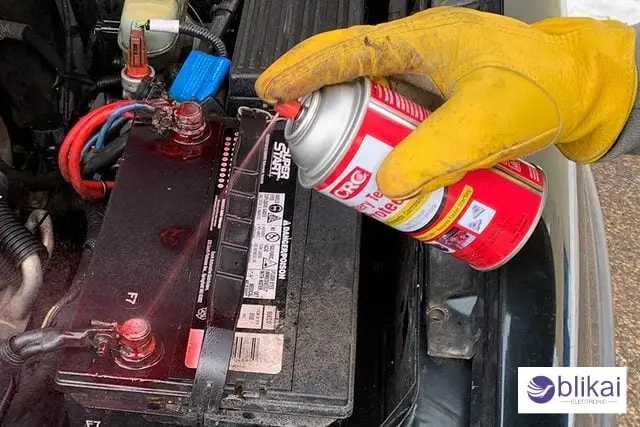
In order to help prevent corrosion occurrence in the future, it is possible to apply a very thin layer of dielectric grease to battery contacts. It is a protective layer that helps in repelling property of water and minimizes the chances of water leakages in the long run.
What Can You Do to Avoid Battery Corrosion in the Future?
Take out Batteries When in Long-Term Storage
When you will not use a device for the next weeks or months, take off the batteries. Leakage and corrosion of batteries are likely to ensue when storing the batteries in devices over long periods of time, especially in humid or hot systems.
Put Batteries in a Cool and Dry Place
Battery reactions are fastened by high humidity and extreme temperatures. Keep store devices and spare batteries in cool and dry places, and by no means store them directly in the sunshine or even in the heat. Small silica gel packets can be stored using storage boxes, and they have the ability to absorb moisture.
Use Battery Contacts Protective Layer
You can also apply a thin film of dielectric grease onto the terminals after cleaning or before the change of new batteries. This serves to keep the moisture away and also to keep direct contact with the battery chemicals to a minimum to reduce corrosion in the future.
Check Devices and Batteries on a Regular Basis
Check your devices regularly, especially the ones that are not regularly used. Check the presence of white or greenish residue, protruding batteries, and sticky body. The corrosion that has been caused can be cleaned early enough before you end up having to do some serious damage.
Take off Old Batteries and Replace Them as Soon as Possible
Old batteries leak more, even though it may seem that the batteries are working. Do not allow them to expire, but change them when there is an indication of faulty operation, such as a device that loses power periodically.
What to Do in Case of Severe Corrosion?
Break the Circle of DIY Cleaning
In case the corrosion is severe, that is, white or green powder all over the battery compartment, the leaking has spread inside the device, or the batteries are obviously swollen, then do not attempt to clean up yourself. Attempting to eliminate severe corrosion may destroy more of the device or bring about the development of chemical burns.
Disassemble and Change Batteries
Switch off the device and ensure that all the batteries are removed. Place them in an identified covered container to prevent the increase of chemicals. Without touching the residue, use gloves and eye protection.
Assess the Damage
Open the battery section and the other electronic parts. Severe corrosion may destroy metal contacts, circuit boards or plastic casing. The corrosion may require a professional repair in case it has reached the internal electronics.
Seek Professional Help
When using such gadgets as cameras, laptops, medical equipment or some expensive electronic gadgets, contact a certified technician. Describe that the battery compartment is severely corroded, and give their instructions as to cleaning or repair. There is the equipment and chemicals to repair gadgets safely without the devices being damaged permanently by professionals.
FAQ
Does vinegar really work on the corrosion of a battery?
Yes. Whenever there is corrosion of the alkaline batteries, one can use white vinegar or lemon juice to neutralize the corrosion without damaging most of the appliances.
Will battery corrosion be removed by rubbing alcohol?
Light corrosion can be cleaned with rubbing alcohol and dried contacts; however, the chemical accumulation will not be neutralized. It is advisable when mixed with vinegar or baking soda.
Is baking soda harmful to electronics?
No, if used properly. One swab or toothbrush fully neutralizes the acidic residue without damaging the equipment. Do not pour liquid directly on electronics.
How come my batteries are leaking?
The given reasons constitute the most frequent ones: poor batteries, poor brands, excessive temperatures, or excessive battery time in the machines. It is also possible to avoid leaks through the replacement of old batteries in time.
Is green powder powder or white toxic?
It's mildly caustic. Corporals may aggravate the skin or the eyes. Wear any type of gloves always, and never inhale the remnants during cleaning.
Is battery corrosion irreversible?
Yes, most of all when the corrosion extends to internal circuitry. Most devices can be saved by cleaning early, though extreme cases may have to be repaired by a professional.
Conclusion
Poor battery corrosion may destroy your equipment and shorten its life expectancy when uncontrolled. Being aware of the causes of corrosion, its safe cleaning, and prevention, you will be able to save your electronics and not have to spend much on repairs. Frequent monitoring, storage, and the utilization of a high-quality battery are very easy but efficient practices. In cases where the cases of corrosion are serious, it is always better to seek professional assistance.
Some images are sourced online. Please contact us for removal if any copyright concerns arise.





