


Nest Power Connector: What It Is, How It Works & Wiring Tips
 529
529What Is a Nest Power Connector?
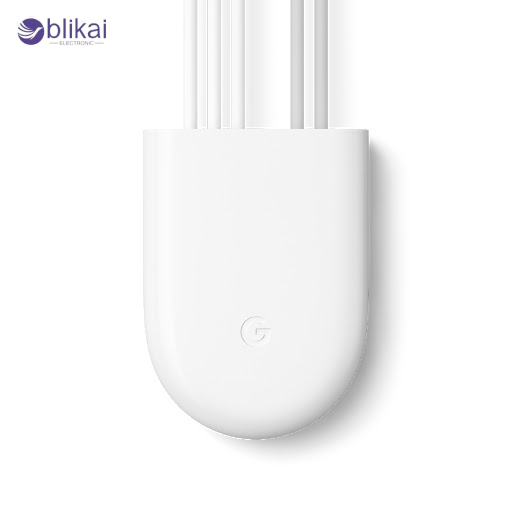
A Nest Power Connector is a low-voltage thermostat power accessory designed to supply continuous power to Google Nest thermostats when a home’s HVAC system does not provide a dedicated C-wire. It eliminates “low power,” “N260,” or “no power” errors by acting as a stable, regulated source of 24VAC control power. Unlike universal C-wire adapters, the Nest Power Connector is tuned to Nest’s internal power requirements and HVAC signal logic, making it more reliable on systems where wiring space or transformer capacity is limited.
Differences Compared to a Traditional C-Wire Adapter
While third-party C-wire adapters are generic, the Nest Power Connector matches Nest’s power draw profile, reducing interference with furnace control boards, fan relays, and compressor call signals.
How the Nest Power Connector Works
Nest Power Connector is an inline low-voltage power bridge between thermostat wires and the HVAC system, providing a constant supply voltage with appropriate control signaling. It also stabilizes 24VAC using internal power conditioning circuits, enabling the thermostat to always have power without having to back-feed the HVAC control board and interrupt the power flow.
Inline Power Regulation
It connects between the R, C, and call wires, providing regulated power that mimics a true common wire without overloading the furnace’s transformer.
Signal-Safe Operation
Its internal electronics ensure that heating, cooling, and fan signals are not confused or overridden by the added power source, which can occur with simple “add-a-wire” kits.
Compatibility Across HVAC Systems
It supports single-stage heating, cooling, heat pumps, and fan-only systems, and is typically installed at the furnace, air handler, zone controller, or boiler interface.
Where It Is Usually Installed
The power connector is mounted near the control board or wiring junction to minimize wire lengths and ensure stable operation.
Wiring the Nest Power Connector: What to Know First
It is necessary to determine your HVAC setup and find out whether you need a Nest Power Connector before installation. Homes that have a C-wire that operates can likely do without the accessory, whereas those that have heat only, cool only, or older controlled zone controllers may have to have it. Before starting, safety, identification of wiring, and the type of the system are very important.
Tools and Safety Considerations
A screwdriver, wire stripper, labeling tape, and power shutoff verification are essential. Always turn off the furnace breaker before touching low-voltage wiring.
Recognizing HVAC Terminal Labels
Common board labels include R (power), C (common), Y (cool), W (heat), O/B (heat pump), and G (fan). These must be correctly identified to avoid shorting the transformer.
When a Power Connector Is Required
If the thermostat displays “no C-wire,” “low voltage,” or “N260” errors, or if converting from a battery thermostat, the accessory is recommended.
System Differences Affecting Installation
Heat-only boilers, cooling-only units, and multi-stage heat pumps require different wire routing, which the Nest app guides during setup.
Manufacturer Guidance and Diagrams
Although Nest includes a wiring chart, each HVAC system may route wires differently; labeling and photographing existing connections is strongly advised.
Step-by-Step Nest Power Connector Installation Guide
This part will be a systematic guide on how to install the Nest Power Connector at the HVAC control board. In every step, the identification, routing, connection and verification are elaborated, in order to make the system identify the accessory.
Step 1 — Turn Off Power and Access the Control Board
Turn off the furnace switch or breaker, remove the panel, and locate the main control board containing labeled terminals such as R, C, and call wires.
Step 2 — Identify Existing Thermostat Wires and Match Terminals
Locate the thermostat wires and confirm the call signal (Y, W, or G). Ensure each wire is properly matched to the board labels used by the Nest connector.
Step 3 — Connect R, C, and the Call Wire to the Power Connector
Attach the power connector’s wires to the furnace terminals: R to R, C to C, and the corresponding call terminal to the matching HVAC output.
Step 4 — Mount the Connector and Secure All Wiring
Install the connector using the adhesive or screws that come with it, and the wires should be fastened using cable ties so that they are not subject to vibration and strain.
Step 5 — Restore Power and Verify Operation via the Nest App
Restore power, allow the thermostat to boot, and follow the Nest app’s guided setup to detect the power connector and confirm signal presence.
Common Nest Power Connector Issues & Troubleshooting Tips
Although in most cases, the system is secure, there are chances of some systems having wiring mistakes or power anomalies. Incompatibility of configuration, sloppy connection or load limit in transformers are the root cause of most problems.
Thermostat Showing Low-Power or N260 Error
This typically means the thermostat is not sensing stable C-wire power; verify R and C connections on both the connector and control board.
HVAC Not Turning On After Installation
A disconnected call wire (Y, W, or G) or incorrect terminal placement can turn off heating or cooling functions.
Incorrect Wiring on Split-System HVAC Units
Systems with separate air handler and condenser wiring may require installation at the air handler rather than the furnace.
When to Consider Adding a Real C-Wire Instead
Homes with marginal transformer capacity or multi-zone systems may benefit from installing a dedicated C-wire for maximum stability.
Is a Nest Power Connector Better Than a C-Wire?
A Nest Power Connector offers a practical solution for homes lacking a C-wire, providing stable low-voltage power without rewiring walls. While a real C-wire is traditionally more robust, the power connector’s regulated design makes it a strong alternative in retrofit installations. It excels in situations where running new wiring is costly or impossible, though very old HVAC systems may still benefit from direct transformer wiring.
Benefits of the Power Connector
Quick installation, no wall rewiring, optimized for Nest thermostats, and stable power delivery under varying system demands.
Advantages of Using a Dedicated C-Wire
A true C-wire provides the most consistent voltage and is preferred for multi-stage, high-efficiency HVAC systems.
When the Power Connector Is the Best Choice
Older homes, apartments, and systems with inaccessible cable routing benefit the most from using the accessory.
Long-Term Performance Comparison
Both of them offer quality power, but C-wire is still the best option when it comes to very large systems, while the power connector is outstanding in most common HVAC systems.
Conclusion
The Nest Power Connector is an effective product to be used by any homeowner who does not have a C-wire and wishes to have the smart thermostat working at its best. Its capability to provide house constant low-voltage power without altering the existing system HVAC wiring is also desirable in older systems and retrofit applications. When used correctly, wired properly, and with careful troubleshooting, the Nest Power Connector will only make low-power errors, and it will make thermostats more dependable, making the fullest use of them to control heating and cooling.
FAQ
Is the Nest Power Connector the same as a C-wire adapter?
Not exactly. Both of them fix the problem of missing C-wire, but the Nest Power Connector is designed specifically to work with Nest thermostats and secure HVAC signaling. Generic adapters may cause relay chatter or low voltages.
Why does my Nest thermostat still show the N260 error?
This error means the thermostat still cannot sense stable common-wire power. Check the R, C, and call wiring at the connector and HVAC control board, and ensure the transformer produces at least 24VAC.
Can the Nest Power Connector fix a “delayed” or “power delay” message?
Yes. Those messages are often caused by unstable power or power stealing from furnace relays. The connector provides a regulated voltage that removes the delay.
Can I install the Nest Power Connector myself?
Yes—many homeowners do it successfully. Nevertheless, when the wiring of your HVAC is elaborate or when it is mislabeled, it is safer to get a technician and avoid a transformer short.
Is the Nest Power Connector safe for older furnaces?
Generally, yes—it is low-voltage and safe. But furnaces with very small or weak transformers (below 20VA) may struggle to power both the thermostat and the connector.
Can I run new thermostat wiring instead of using the connector?
Absolutely. If accessible, adding a new C-wire is the most robust long-term solution. The Nest Power Connector is ideal when rewiring is difficult or impossible.
Some images are sourced online. Please contact us for removal if any copyright concerns arise.





